What to expect
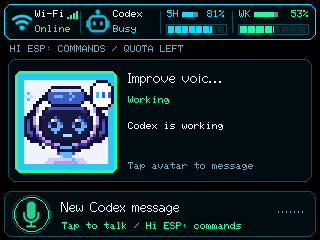
Codex status monitor with automatic usage-reset timers, USB Micro controls, persistent bridge settings and encrypted Bluetooth setup. Use its application guide for controls, prerequisites and recorded device checks.
For live status, configure your private bridge host/key in a local build. The public browser build can demonstrate the UI and setup but has no personal bridge configuration. Read the monitor walkthrough.
Capabilities used
Install and inspect
Install Codex monitor over USB ↗
pio run -e codex-monitor
pio device list
pio run -e codex-monitor -t upload --upload-port <port>
pio device monitor --port <port> -b 115200
Replace <port> with the discovered device. Build before upload. Read the app's partition and storage notes before switching firmware.
Speech firmware includes a model image and a different partition layout from ordinary Arduino apps. Upload all images through its named environment. Existing OTA/filesystem data may be overwritten. NVS compatibility differs between the monitor and standalone diagnostics.
Evidence and controls
Read the application guide and its verification record ↗
Implementation, a passing build, observed serial operation and physical interaction are separate evidence levels. Check the guide's open device checks before relying on an unmeasured behavior.